
By Iain Russell, Patent Attorney and Director at Russell IP (BSc, CPA, EPA, FRSA – 20 years’ experience in computer-implemented inventions and music technology).
What Drawings Do Software Patents Typically Include?
Published: June 2026 | Last updated: June 2026
Software patent applications often rely heavily on drawings to explain how an invention works. The types of software patent drawings used can look quite different from those in mechanical or chemical cases, mainly because the invention is usually a process or a system rather than a physical object you can show in physical form.
At Russell IP, we specialise in protecting software and technology innovations, including computer-implemented inventions (CIIs). In our experience, choosing the right drawings – and the right level of detail – can make a real difference to how clearly an application communicates the invention.
This post is a general introduction for founders, inventors, and technical teams who are new to patents. The example drawings shown below are not tied to any specific invention. They simply illustrate the general types of drawing you might come across in practice. Real software patent applications can look quite different: sometimes not all of these types are needed, and often other types are used as well.
In this post, we will explain what software patent drawings are, walk through six common types with examples, summarise them in a comparison table, and explain why getting them right can matter.
Key Takeaways
- Software patent drawings are the figures in a patent application that show how a computer-implemented invention is structured and how it works, usually as diagrams rather than mechanical views.
- Common types include system architecture diagrams, block diagrams, flowcharts, user interface views, data structure or schema diagrams, and network or communication diagrams.
- Drawings are usually optional in a strict legal sense, but they are very commonly used for software inventions because a sequence of steps or a system of components can be hard to describe in words alone.
- Including too much detail – such as a screenshot with sensitive information – can be just as much of a problem as including too little.
- The right combination of drawings depends on the invention, and professional input can help show its full breadth while meeting formal requirements.
Important note: This article is a general guide to software patent drawings. It is not legal advice. Every invention and patent strategy is different. If you need advice on your specific situation, please contact Russell IP to discuss your circumstances.
Contents
- What are software patent drawings, and why do they matter?
- Are drawings required for a software patent?
- What is a system architecture diagram?
- What is a block diagram in a patent application?
- How are flowcharts used in software patents?
- Should a software patent include a user interface (UI) view?
- What is a data structure or schema diagram?
- What is a network or communication diagram?
- What other types of patent drawing are used for software?
- Software patent drawings at a glance
- Why does getting your software patent drawings right matter?
- Conclusion
- Frequently Asked Questions
What Are Software Patent Drawings, And Why Do They Matter?
Software patent drawings are the figures included in a patent application to show how a computer-implemented invention is structured and how it works. Because software inventions are often processes or systems rather than physical objects, the drawings tend to be diagrams, flowcharts, and similar illustrations rather than mechanical views.
These drawings support the written description, help the reader understand the invention, and are usually referred to by reference numbers in the text. The point is to communicate the technical idea clearly to a patent examiner and, later, to anyone reading the granted patent.
It is worth repeating that not every application needs every type of drawing described below, and other types are often used instead or in addition. The examples here are illustrative only.
Are Drawings Required For A Software Patent?
Drawings are usually optional in a strict legal sense, but in practice they are almost always included for software inventions. Under European practice, for example, a patent application must contain any drawings referred to in the description or claims, which means the drawings you rely on become part of what must be present and correct. Drawings also have to meet formal presentation requirements set by the relevant office, such as the UK IPO and the EPO. Notably, diagrams such as block diagrams and flowcharts are treated as formal drawings and must meet the same standards as any other figure.
What Is A System Architecture Diagram?
A system architecture diagram, sometimes called a system diagram, shows the main entities of a system and how they relate to one another. In a software patent application, it is often used to describe the overall environment in which the invention is implemented, before the application goes into the more specific details of the implementation itself.
The example below uses icon-style images of some of the entities, such as client devices, a network, a server, and a printer for report output. Sometimes a system diagram simply uses plain blocks instead of icons. Either approach can work, depending on what is being shown.
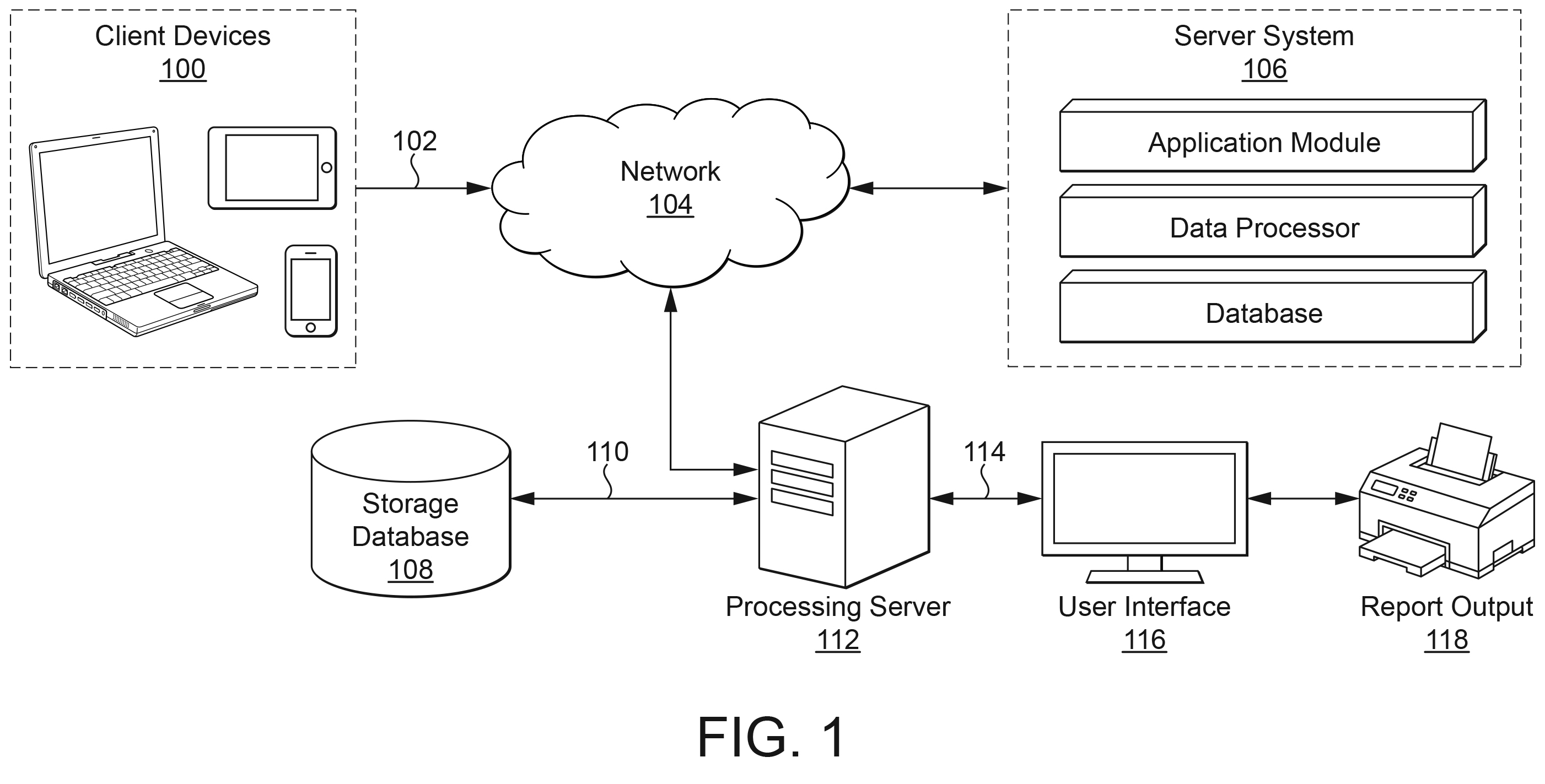
Figure 1: An example system architecture diagram. The drawings shown here are illustrative and not tied to any specific invention.
What Is A Block Diagram In A Patent Application?
A block diagram represents the components or elements of a system using labelled blocks. Each block usually stands for a logical or functional part of the system, and any text inside a block indicates what that part does.
In the example below, the text within each block describes the component, such as an input module, a processing engine, or a storage module. Some drawings include this kind of brief explanatory text and some do not. There can be reasons for and against both approaches: explanatory labels can aid understanding, but they can also influence how a feature is later interpreted, so the choice is not always straightforward.
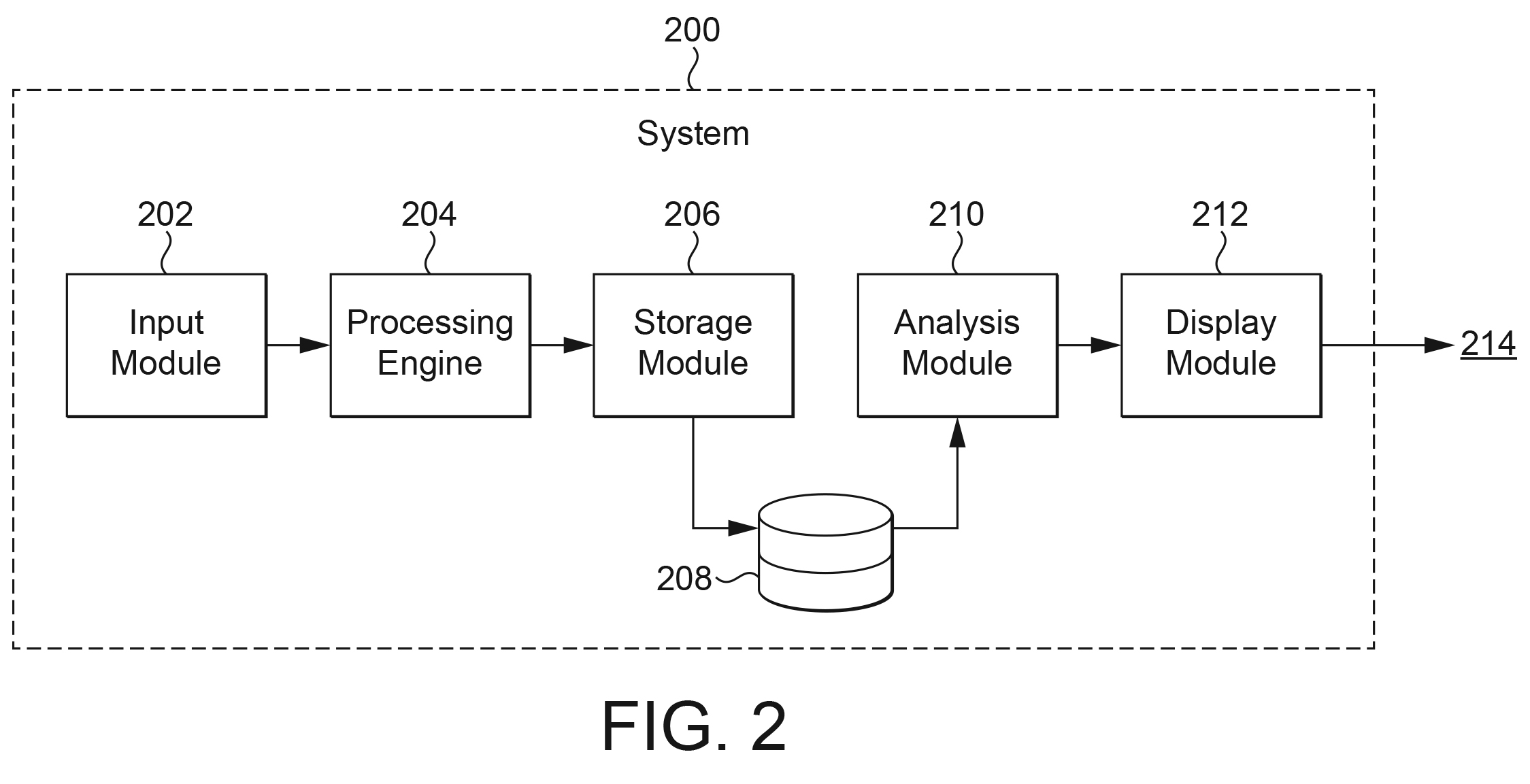
Figure 2: An example block diagram using labelled functional blocks.
How Are Flowcharts Used In Software Patents?
A flowchart explains how an invention operates as a series of steps in a method. Flowcharts are particularly useful in software patent applications because many software inventions are best described as a sequence of actions and decisions rather than as a static structure.
There are well-established conventions around the standard shapes used in flowcharts. Different shapes can designate different things, such as actions or steps, decisions, and the start and end of a process. The example below shows a typical layout, with a decision point that branches depending on the outcome.
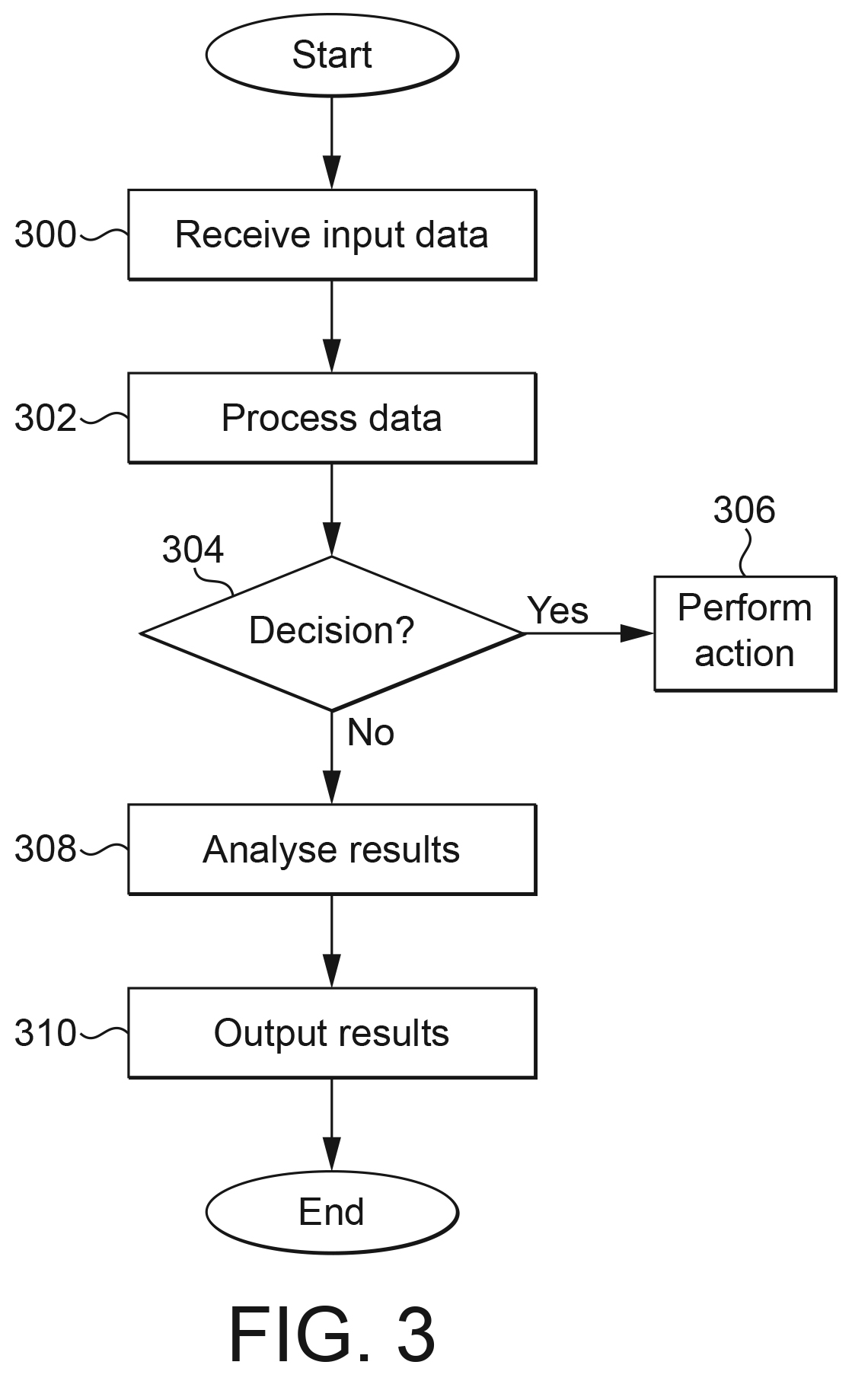
Figure 3: An example flowchart showing method steps, including a decision point.
Should A Software Patent Include A User Interface (UI) View?
Sometimes, but it depends on the circumstances. A view of a user interface can help illustrate how a user interacts with the invention, but care is needed over how much detail to include. A real screenshot may contain sensitive information, or other detail that is best not included in a published patent application.
This is one of many areas in which professional input can be helpful, to ensure that a drawing shows the right level of detail: enough to support the invention, but not so much that it introduces material you would rather keep out of the public record.
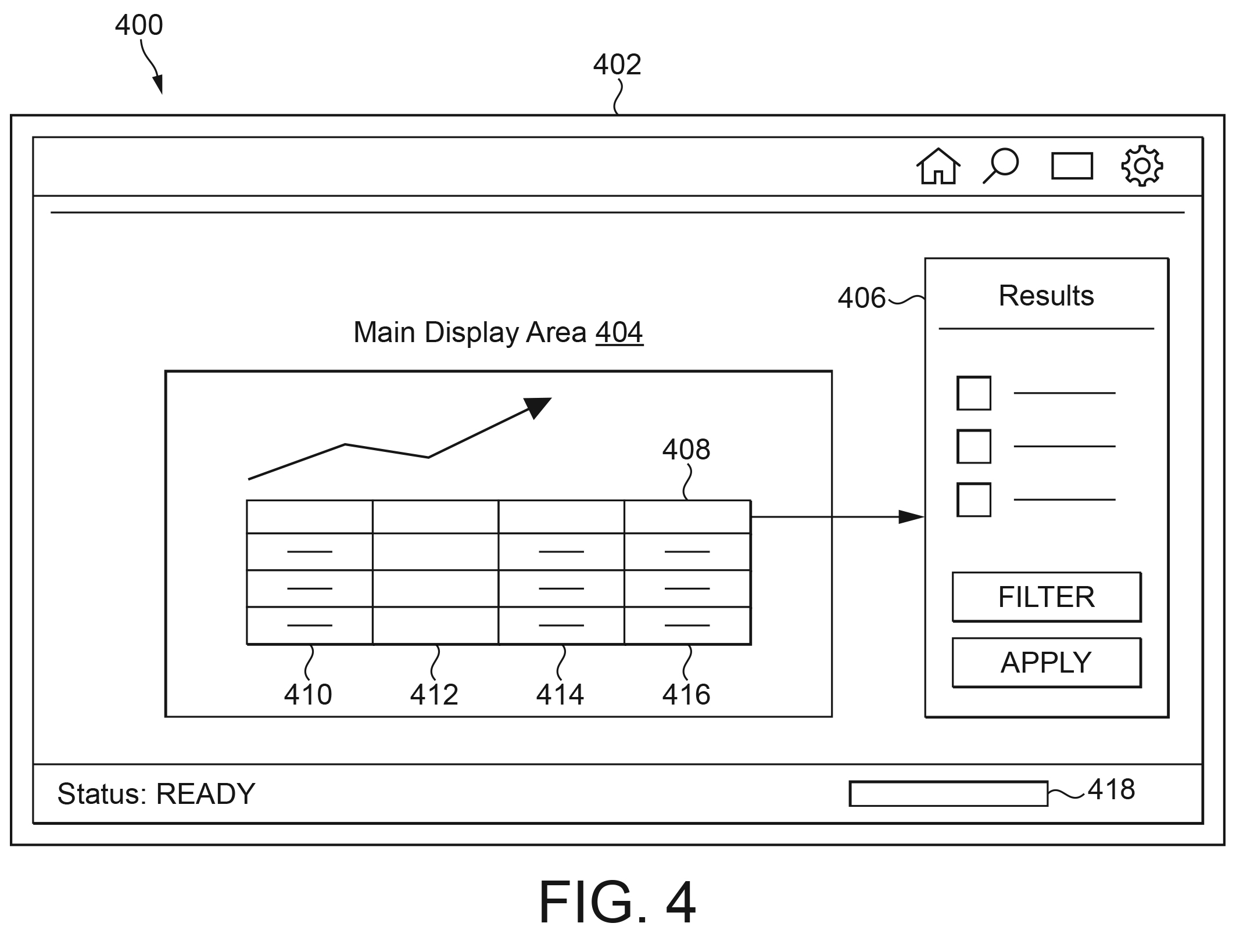
Figure 4: An example user interface (UI) view, simplified rather than a real screenshot.
What Is A Data Structure Or Schema Diagram?
A data structure or schema diagram illustrates how data is organised and how different tables or records relate to one another. It can be useful where the invention involves a particular way of storing, structuring, or linking data.
In our experience, this type of diagram tends to be used less often than the others in this article. That said, it can be valuable for data-centric inventions, where the relationships between tables are part of what makes the invention work.

Figure 5: An example data structure or schema diagram showing relationships between tables.
What Is A Network Or Communication Diagram?
A network or communication diagram shows the various devices or entities in a network and how they communicate with each other. It is often used where an invention involves several devices, servers, or services exchanging information.
This type of diagram suits distributed systems, client-server inventions, and cloud-based services, where the way components connect and communicate is central to the invention. The example below shows a server communicating with several client devices, a database, a cloud service, and external systems.

Figure 6: An example network or communication diagram.
What Other Types Of Patent Drawing Are Used For Software?
Many other types of drawing are used in software patent applications beyond the six above. A common example is a message flow diagram, also known as a signalling diagram, which shows the sequence of messages exchanged between entities over time. Graphs and charts are also used – for example, to show the performance of an invention based on tests that have been conducted.
The breadth of possible drawing types is itself a reason that professional input can be helpful. The aim is to demonstrate the full breadth of the invention in the application, using the drawings that best fit it.
Software Patent Drawings At A Glance
The table below summarises the main types of software patent drawing covered in this post, what each one typically shows, and when it tends to be used. Not every application uses every type, and the right combination depends on the invention.
| Drawing type | What it typically shows | Often used for |
|---|---|---|
| System architecture diagram | The main entities of a system and how they relate, sometimes using device icons | Setting out the overall environment before the detailed implementation |
| Block diagram | Components or elements of a system as labelled functional blocks | Describing the logical or functional parts of a system |
| Flowchart | A method as a sequence of steps, actions, and decisions | Explaining how the invention operates step by step |
| User interface (UI) view | How a user interacts with the invention, usually simplified | Illustrating user-facing features, with care over detail |
| Data structure / schema diagram | How data is organised and how tables or records relate | Data-centric inventions; used less often than other types |
| Network / communication diagram | Devices or entities in a network and how they communicate | Distributed systems, client-server, and cloud-based inventions |
| Message flow / signalling diagram | The sequence of messages exchanged between entities over time | Protocols and interactions between components |
| Graphs and charts | Performance or results, for example from tests | Demonstrating technical effect or advantages |
Why Does Getting Your Software Patent Drawings Right Matter?
Choosing the right drawings, and the right level of detail, can affect how clearly an application communicates the invention, and in some cases how broadly it ends up being protected. Too little detail may fail to support the claims, while too much – or the wrong detail – can introduce information that is better left out of a published application.
Drawings also have to satisfy formal presentation requirements. The UK IPO and the EPO both set rules on how drawings must be prepared, and block diagrams and flowcharts are treated as formal drawings subject to those rules. The UK IPO’s own guidance on drawings suggests that applicants would be well advised to seek professional assistance when preparing an application.
This is where working with a patent attorney can help. The goal is to use the drawings that best demonstrate the full breadth of the invention, at an appropriate level of detail, while meeting the formal requirements. You can read more about how an application moves through examination in our guide to accelerating UK patent prosecution, and more about wider AI and software issues in our AI in IP series.
Conclusion
Software patent drawings are central to explaining a computer-implemented invention, and they come in many forms: system architecture diagrams, block diagrams, flowcharts, user interface views, data structure diagrams, network diagrams, and more. The examples in this post are illustrative, and real applications often use a different mix.
The main takeaway is that the choice of drawings – and the level of detail in each – is a judgement that depends on the invention. There is rarely a single correct answer, and the same idea can be shown in several valid ways. Getting that judgement right, while meeting the formal requirements, is part of preparing a strong application.
If you are considering filing a patent application for a software invention, or you are looking for a patent attorney to help you prepare and file one, contact Russell IP today for a free, no-obligation discussion. You can also learn more about our patent services.
Disclaimer: This article is general information, not legal advice. For tailored guidance, please contact Russell IP.
Frequently Asked Questions About Software Patent Drawings
What are software patent drawings?
Software patent drawings are the figures in a patent application that show how a computer-implemented invention is structured and how it works. Because software is usually a process or a system rather than a physical object, these drawings tend to be diagrams and flowcharts rather than mechanical views. At Russell IP, we help inventors choose and prepare drawings that communicate a software invention clearly.
Do software patents need drawings?
Drawings are usually optional in a strict legal sense, but they are very commonly included for software inventions. A sequence of steps or a system of interacting components is often difficult to describe in words alone, so most software patent applications include one or more diagrams. If you do refer to a drawing in the description or claims, it generally needs to be present and to meet the relevant formal requirements.
What types of drawing are used in software patent applications?
Common software patent drawings include system architecture diagrams, block diagrams, flowcharts, user interface views, data structure or schema diagrams, and network or communication diagrams. Other types, such as message flow (signalling) diagrams and performance graphs, are also used. Not every application uses every type, and the right combination depends on the invention.
Can a flowchart be used as a patent drawing?
Yes. A flowchart is one of the most useful drawing types in software patent applications, because it explains how an invention operates as a sequence of steps and decisions. Flowcharts follow conventions around standard shapes for actions, decisions, and the start and end of a process, and they are treated as formal drawings that must meet the relevant presentation rules.
Is it safe to include a screenshot of my software’s user interface?
Not necessarily, so take care. A real screenshot may contain sensitive information or detail that is better left out of a published patent application. A simplified user interface view can still illustrate how a user interacts with the invention without exposing more than you intend. Russell IP can help you judge the right level of detail before anything is filed.
How many drawings does a software patent application need?
There is no fixed number. The right amount depends on the invention and on how much is needed to explain and support it clearly. Some software patent applications use a single diagram, while others use many. The aim is to include enough to support the claims and demonstrate the invention, without adding material that is unnecessary or best kept out.
Do I need a patent attorney to prepare software patent drawings?
You are not legally required to use one, but professional input can be valuable. Deciding which software patent drawings to include, at what level of detail, and how to meet the formal requirements, is a matter of judgement that affects how clearly and broadly an invention is described. Russell IP specialises in computer-implemented inventions and can help prepare drawings as part of an application.
Can Russell IP help with software patent drawings?
Yes. Russell IP specialises in protecting software and technology innovations, including computer-implemented inventions, and we can advise on which software patent drawings best suit your invention and how much detail to include. If you are preparing or filing a patent application, get in touch with Russell IP for a free, no-obligation discussion.